Showing posts with label Others. Show all posts

RemoveWAT 2.2.5 | 6.35 MB

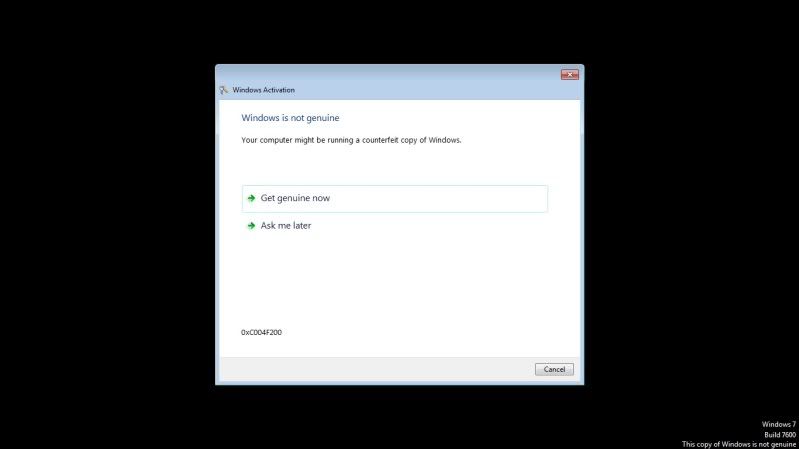
Jika sebelumnya anda mempunyai masalah dengan WGA atau "Windows Genuine Advantadge" pada Windows 7 atau Windows Server 2008 R2 anda dan muncul tanda tanda seperti berikut:


1. Desktop Menjadi Gelap dan ada tulisan "The copy of Windows is not genuine" di pojok kanan bawah desktop anda.


2. Dan muncul beberapa jendela Windows seperti ini ketika anda baru menghidupkan PC atau Laptop anda


Jika terjadi tanda-tanda seperti gambar yang diatas pada Windows7 dan Windows Server 2008 R2 anda itu berarti Mikocok telah mendeteksi bahwa Windows7 dan Windows Server 2008 R2 yang anda pakai itu Tidak Asli atau bisa dibilang Bajakan.

Tapi tenang saudara saudara dengan Software RemoveWAT 2.2.5 yang terbaru ini bisa membuat Windows7 dan Windows Server 2008 R2 anda yang terkena Windows Genuine Validation bisa menjadi seperti asli.

Karena RomoveWAT adalah sebuah software sederhana yang bisa Anda gunakan untuk mem-bypass aktifasi Windows Genuine Advantage pada sistem operasi baru milik Microsoft yaitu Microsoft Windows 7 dan Windows Server 2008 R2.

RemoveWAT ini sangat ampuh untuk menghapus Windows 7 Activation Key untuk menjadikan sistem operasi Microsoft Windows 7 dan Windows Server 2008 R2 berjalan tanpa harus meminta memasukkan Serial Key selama Anda suka memakainya. 


NOD32 AV Eset SS Key Finder 8.01 Updated September 2010 | 9.3MB

All-In-One Key Finder for Nod32 Anti-Virus and Eset Smart Security.

1. Go To Advanced Setup And Then Web Access > HTTP, HTTPS > Adress Management

2. Make sure Its List Of Addresses Excluded From Filtering

3. Click Add Then Put *ulisessoft* In The Box

4. Check That Is The Right Spelling

5. Click Ok

6. Click again Add Then Put *eset* In The Box

7. Check That Is The Right Spelling

8. Click Ok

Download Eset NOD32 Key Finder 8.01:
Ziddu

HJSplit 2.4 | 335 KB

HJSplit 2.4 dikembangkan untuk membantu Anda membagi file dari setiap jenis dan ukuran. HJSplit juga dapat membagi dan menggabung file yang berukuran lebih dari 10 Gb. Software ini juga dapat digunakan untuk membandingkan file dan sebagai kalkulator checksum.

HJSplit dapat membantu Anda dalam menciptakan backup yang sangat besar (multi-gigabyte) file. Hanya membagi sebuah file 10 Gb menjadi lebih kecil bagian 640 Mb, dan membakar mereka dengan menggunakan software CD CD-menulis standar. Mengembalikan file-file ini dapat dilakukan dengan menggunakan HJSplit juga, dengan menggunakan 'bergabung' fungsi.

HJSplit 2.4 is developed to help you split files of any type and size. It can split and join files larger than 10 Gb. It can also be used to compare files and as a checksum calculator.

HJSplit can also assist you in creating backups of very large (multi-gigabyte) files. Just split a 10 Gb file into smaller 640 Mb parts, and burn them to CD's using standard CD-writing software. Restoring these files can be done using HJSplit as well, using the 'join' function.

Download HJSplit 2.4:
Ziddu

Kaspersky All version Activation Key (25th June 10)
Download:
http://www.enterupload.com/vimu915wk5dg/25th_Jun_KIS_KAV-KEY.rar.html


Keygen works for the following softwares:
  • Sound Forge 9.0 Series
  • Sound Forge 10.0 Series
  • Sound Forge Audio Studio 9.0 Series
  • DVD Architect Pro 4.5-5.0 Series
  • DVD Architect Studio 4.5 Series
  • Vegas Pro 8.0 Series
  • Vegas Pro 8.1 (64 bit) Series
  • Vegas Pro 9.0 (32 and 64 bit) Series
  • Vegas Movie Studio 8.0 Series
  • Vegas Movie Studio 9.0 Series
  • Vegas Movie Studio Platinum 8.0 Series
  • Vegas Movie Studio Platinum 9.0 Series
  • ACID Music Studio 7.0 Series
  • Acid Pro 7.0 Series
  • ACID Pro 6.0d (Build 363)
  • CD Architect 5.2c (Build 214)
  • Cinescore 1.0c (Build 271)
  • Photo Go 1.0b (Build 123)
  • Noise Reduction Plugin 2.0h (Build 451)
  • Dolby Digital AC-3 Pro Plugin 1.0 (Build 3060)
  • MainConcept MPEG-1&2 Pro Plugin 2.0 (Build 2022)
  • Vegas Movie Studio HD 9.0 Series

Download:
http://www.enterupload.com/iiqw1xpi6g5i/Sony.Products.Multi_.1.8._.rar.html


This will automatically activate the lastest version of following softs (all languages) without editing your host or other things smile

* Adobe Photoshop CS5 - EXTENDED
* Adobe Flash Professional CS5
* Adobe Bribge CS5
* Adobe Dreamweaver CS5
* Adobe Media Encoder CS5
* Adobe Soundbooth CS5
* Adobe OnLocation CS5
* Adobe Encore CS5
* Adobe Device Central CS5
* Adobe Premiere Pro CS5
* Adobe After Effects CS5
* Adobe InCopy CS5
* Adobe Contribute CS5
* Adobe Fireworks CS5
* Adobe InDesign CS5
* Adobe Illustrator CS5

Download:
http://sharingmatrix.com/file/4082907/Adobe.CS5.Products.Activator.rar

New cracked Windows Genuine Advantage. 100% working on Windows Update, Microsoft Download Center and Microsoft Update. And no nag screens.

Windows Genuine Advantage (WGA) adalah sistem anti-pembajakan yang diciptakan oleh Microsoft yang memaksa Microsoft Windows online validasi keaslian dari beberapa sistem operasi Microsoft baru-baru ini ketika Microsoft Windows mengakses beberapa layanan, seperti halnya Windows Update, dan men-download Windows komponen dari Microsoft Download Pusat. Khusus, WGA mencakup Windows XP dan Windows Vista. Tidak menutupi Windows 2000, Windows Server 2003 atau Windows 9x keluarga. Namun, beberapa download dan non-update penting dari Pusat Download untuk Windows 2000 memerlukan validasi.

Windows Genuine Advantage (WGA) is an anti-piracy system created by Microsoft that enforces Microsoft Windows online validation of the authenticity of several recent Microsoft operating systems when accessing several Microsoft Windows services, such as Windows Update, and downloading Windows components from the Microsoft Download Center. Specifically, WGA covers Windows XP and Windows Vista. It does not cover Windows 2000, Windows Server 2003 or the Windows 9x family. However, certain downloads and non-critical updates from the Download Center for Windows 2000 require validation.
Size : 6.9 MB 

Virtual CD screenshot 2
Virtual CD 10.1.0.0 Retail | 103.93 Mb

Dengan Virtual CD Anda tidak hanya dapat membuat dan menggunakan virtual CD, tapi juga membakar CD dan DVD virtual. Terlepas dari apakah Anda sendiri ingin menguji diciptakan DVD, untuk membuat sebuah CD audio atau hanya tidak kebetulan punya kosong disk untuk CD data di tangan, withVirtual CD Anda selalu memiliki pembakar dengan disk kosong yang dapat Anda gunakan dari program apapun. Anda dapat menggunakan CD atau DVD yang dibuat dengan cara ini segera withVirtual CD dan membakar mereka pada medium fisik, jika perlu.

Menggunakan program mulai diperluas cepat, anda dapat hampir menggunakan fungsi Virtual CD tanpa harus memulai Virtual CD Manajemen atau kotak peralatan. Dengan sederhana klik kiri pada Virtual CD simbol yang anda tiba di menu program di mana Anda dapat memanfaatkan semua fungsi penting Virtual CD. Di sisi lain, jika Anda klik pada simbol dengan tombol mouse sebelah kanan, menu drive akan terbuka. Di sini Anda dapat e.g. memasukkan dan mengeluarkan gambar atau masukkan CD kosong di kompor virtual.

Tidak hanya Virtual CD melayani Anda dengan baik-engineered ergonomy, tetapi juga menjaga keamanan data Anda dalam pikiran. Untuk melindungi data sensitif dan untuk menyimpan file rahasia, Anda dapat menggunakan virtual RAM DVD CD kosong sebagai disk tetap dienkripsi dengan sampai 17,5 GB. Setelah memasukkan password anda, anda dapat membaca dan menulis data anda itu seolah-olah Anda sedang menggunakan disk tetap biasa. Di latar belakang, Virtual CD kode data-Mu-terbang dengan aman-enkripsi AES 256bit tanpa memperhatikan apa-apa.
Mulai sekarang Anda dapat menggunakan Virtual CD juga di bawah Vista dan 64-bit sistem operasi Windows.

With Virtual CD you can not only create and use virtual CDs, but also burn virtual CDs and DVDs. Regardless of whether you yourself would like to test a created DVD, to put together an audio CD or just not happen to have a blank disk for a data CD at hand, withVirtual CD you always have a burner with a blank disk that you can use from any program. You can use the CDs or DVDs created in this manner immediately withVirtual CD and burn them on a physical medium, if necessary.

Using the expanded quick start program, you can nearly use any Virtual CD function without having to start the Virtual CD Management or the toolbox. With a simple left click on the Virtual CD symbol you arrive at the program menu where you can utilize all important Virtual CD functions. On the other hand, if you click on the symbol with the right mouse key, the drive menu opens. Here you can e.g. insert and eject images or insert blank CDs in the virtual burner.

Not only does Virtual CD serve you with its well-engineered ergonomy, but it also keeps the security of your data in mind. To protect sensitive data and to keep files confidential, you can use a virtual DVD RAM blank CD as an encrypted fixed disk with up to 17.5 GB. After entering your password, you can read and write your data on it as if you were using a regular fixed disk. In the background,Virtual CD codes the data on-thy-fly with the safe AES 256bit-encryption without your noticing anything.
From now on you can use Virtual CD also under Vista and 64-bit Windows operating system.

Functions:
"Data safe" mode
With the new data safe mode, encrypted drives can be created automatically. This makes it easy to protect sensitive data from unauthorized access. Encrypted drives do not differ from ordinary drives in operation or handling.

Sound file mode
Virtual CD 10 enables fast conversion of any audio file type into the flexible and widely used MP3 and OGG Vorbis formats. The user can determine the desired quality for all formats.

Direct burning functions
The revised Editor in Version 10 has a media-burning function that lets you burn your choice of data directly onto a CD, DVD or Blu-ray Disc. Thus one slender burningprogram serves all
your needs.

Expanded ISO support
Virtual CD 10 lets you store descriptions, comments and passwords with your ISO files. This means you have practically the same level of convenience with standardized ISO files that you have with genuineVirtual CD images.

Flexible allocation of images to drives
Starting now, images can also be "inserted" in any physical drive

Integrating external programs
You can now integrate external programs in the Virtual CD interface, both in the Quick Launch menu and in CD Management. You can also pass arguments on the command line when a program is called, for easy automation of tasks.

Extended API
The Virtual CD API for professional and semi-professional use has once again been expanded and improved. Now it is even easier to use external programs to control and operateVirtual CD.


Mobile Master 7.5.7 Build 3162
Mobile Master 7.5.7 Build 3162 | 18.9 Mb

Mobile Master adalah suatu perangkat lunak telepon selular untuk telepon selular manajemen dan SMS komunikasi yang dapat digunakan untuk pertukaran data antara ponsel dan PC. Melalui kabel, inframerah, atau Bluetooth, sistem akan secara otomatis mendeteksi ponsel dan menetapkan profil itu sendiri, sehingga memungkinkan untuk mengelola beberapa telepon tanpa membuat kekacauan dengan data. Asisten membantu dengan pengaturan. Bahkan pengguna dengan pengetahuan sebelumnya tidak dapat, misalnya, telepon mereka men-download data buku alamat ke PC dengan hanya beberapa klik mouse. Mengedit dan menyinkronkan entri kalender (janji dan tugas). Kirim, membaca, arsip SMS Catatan: SMS Hamba disertakan dalam Mobile Master instalasi tapi memerlukan lisensi tambahan. Logo-Editor, memodifikasi nada dering. Salin Stasiun untuk transmisi buku alamat Anda dengan mudah dari satu ponsel ke yang lainnya. MobileMaster Agen: selalu mencapai fungsi-fungsi penting dengan mudah dan mulai misalnya Mobile Master secara otomatis segera setelah ponsel Anda terhubung ke PC.

Mobile Master is a mobile phone software tool for mobile phone management and SMS communication that can be used to exchange data between mobile phone and PC. Via cable, infrared, or Bluetooth, the system automatically detects the mobile phone and assigns it its own profile, making it possible to manage several phones without creating chaos with the data. An assistant helps with the settings. Even users with no prior knowledge can, for example, download their phone�s address book data to the PC with just a few mouse clicks. Edit and synchronize calendar entries (appointments and tasks). Send, read, archive SMS Note: the SMS Servant is included in the Mobile Master installation but requires an extra license. Logo-Editor, modify ring tone. Copy Station for transmitting your address book easily from one phone to the other. MobileMaster Agent: reach always the important functions easily and start e.g. Mobile Master automatically as soon as your mobile phone is connected to the PC.

� One click synchronization solution for your mobile phone, edit all you phones data with the computer. Synchronization of contacts and the calendar, Many filter possibilities, AddIns for Outlook, Lotus Notes, Palm Desktop and Thunderbird
� Mobile Master synchronizes or just copies all data with/to your mobile phone.
Synchronize with: Outlook, Lotus Notes, Novell Groupwise, Palm Desktop, Thunderbird, Tobit David, Eudora, The Bat, Outlook Express, Googlecalendar, Windows contacts and calendar, iTunes
� new cell phone: Mobile Master copies the phone/address book from your old to your new one regardless the manufacturer of the phones new phone number, appointment or note: type it in with your PC and send it easily to the cell phone.
� Many import and export filters, e.g. one click to export to excel or open office. Can import e.g. vcf file with more than one contact and that has unicode format
� Connection with the phone: serial or USB cable, infrared or Bluetooth, up to COM Port 300 supported.

Features:
� Mobile Master is a handset manager to edit manually or synchronize automatically or on demand
� Quick area for quick and easy access to the main functions
� Comfortable editing of the phone book, calendar and note items
� easy to use user interface
� Setup Wizard for easy configuring
� Copy files, music, photos
� SMS send, archive
� Copy the address book, calendar from one phone to another
� At least one update per month for the phones and devices
� Copy play lists from iTunes and WinAmp to the phone

Runs on /Synchronizes via: Windows 7, Windows Vista, Windows XP, Windows 2000

Changes in Version 7.5.7 build 3162 (3.1.2010):
* New Features:
o Done modifications for Novell Groupwise 8.0.1
o Thunderbird Lightning 1.0 now supported
* Fixed bugs/solved problems:
o Thunderebird AddIn: fixed problem with the installation
o Swiss language file was corrupt in the last installation

Popular Posts